Showing posts with label *Publishing: Amazon. Show all posts

Wednesday, 2 October 2019

How to Format an eBook - 2019 Edition


How to Format an eBook - 2019 Edition

Technology is always changing and things have progressed since I last wrote a blog post on how to format eBooks. I have just written myself a new checklist for creating eBooks in what I consider to be the most efficient way, so I thought I'd share. Now don't take this as me saying, this is the only way to do it, but this is how I do it, and it works for me. No doubt by the time I hit publish the tech will have changed again!
Software required:


Steps to Create an eBook:

The Kindle Version:


I start with this one because the Kindle Create Add-in makes life so much easier.
  1. Make sure the manuscript is ready for publishing and has been thoroughly edited.
  2. Install the Kindle Create Add-in.
  3. Go to the Kindle tab in Word and click the Get Started button.
  4. Choose the theme for the book.
  5. Save the book file (I usually put -KINDLE on the end of my file names so I can always tell them apart). N.B. Make sure to save regularly through the formatting process to avoid losing anything.
  6. Click Insert Template Page from the ribbon and choose Book Title Page - from now on when inserting a page type, they all come from the Insert Template Page
  7. Insert Copyright Page
  8. Search and replace Book Title with the book's title.
  9. Search and replace Author Name with the author's name.
  10. Edit or delete the Book Subtitle as required.
  11. On the copyright page edit the Cover Designer, website, ISBN and edition information.
  12. Insert Dedication page if required and edit.
  13. Insert Table of Contents page.
  14. Insert Other Page (font/back matter) if you wish to have an acknowledgements section or any other front matter.
  15. If you book has parts insert Part Title Page.
  16. Insert Chapter Title Page
  17. Copy the chapters from your manuscript and paste them into a text only editor like Notepad or PSPad to get rid of any formatting.
  18. Paste chapters into Kindle Create doc and make sure everything is formatted as the "Normal" style.
  19. At the beginning of each chapter insert a Chapter Title Page.
  20. For each chapter do the following:
    1. Copy the chapter title and paste it into the Chapter Title position on the Chapter Title Page
    2. If you have no chapter subtitle and no chapter quote, delete the quote and reformat the subtitle placeholder to be 8pt. Then delete the text, but leave the paragraph marker. This is to prevent the eBook preview from crashing because there is a bug. There has to be something between the chapter title and the first paragraph.
      or
    3. Copy the chapter subtitle and paste into the correct place, or delete the chapter subtitle placeholder.
    4. Copy the chapter quote and paste into the correct place or delete the chapter quote.
    5. Change the drop cap letter to be the first letter of your first paragraph for the chapter.
    6. Copy the first paragraph, apart from the first letter (not including the paragraph marker) and paste into the first paragraph of the chapter.
    7. Delete everything between the first paragraph and the second paragraph.
  21. Optional - change some of the first line of the first paragraph to be all caps. If you are only doing a Kindle book the "all caps" formatting option will work, if you want to convert to ePub later, typing it in in capital letters is more compatible.
  22. Insert back matter using Other Page (font/back matter) for each that you wish to appear in the table of contents.
  23. If you wish to have back matter that is not in the table of contents, add in a section break to create a new page, add in your content and then create your own header style based on other back matter pages, so it will look the same, but not be gathered for the table of contents.
  24. Save!
  25. Check the book using the Kindle Preview from the ribbon.
This docx file should now be ready to upload to KDP. Always check in the previewer once the file is uploaded, but I have never had a problem with the conversion.

Convert to ePub:


For those who need ePub files, it is very easy to convert from the KINDLE to something that looks good in an ePub viewer and passes ePub checks. You will need your cover file ready to create this version, even though it is best to upload it separately on Google Play.
  1. Re-save the file with a new name. I just add -EPUB to the end.
  2. Change the ISBN and any of the rest of the copyright page that is not correct for the edition.
  3. Delete all the drop cap letters from the beginnings of chapters by clicking on their containing box and deleting the whole thing. (They often screw up so it's not worth the risk).
  4. Replace the missing letters with normal ones at the beginning of the paragraph.
  5. Load the docx into Calibre.
  6. Edit the meta data to have the correct title, author, cover and description.
  7. Click convert to ePub - make sure to check the "maintain aspect ratio of cover" on the ePub OUT tab.
  8. Save the ePub to disk.
  9. Check the ePub in an ePub reader and with an ePub checker.

Smashwords:


I always create a Smashwords version from plain text because I like their "meatgrinder" conversions, but you can upload the ePub straight to their site with some limitations. You also need to make sure you follow their conventions and have Smashwords Edition on the copyright page as well as an ISBN just for them, if you are using your own. I only create the ePub for Google Play or if I need to put it up for download like in Free Fiction Friday.

For Smashwords, their Smashwords Style Guide has everything you need to know - and yes "The Nuclear Method" does work best.

I have a MS Word template that I've set up with all the front matter, back matter and styles I use for Smashwords and then copy and paste the content in from text only.

Summary

And there you have it, all the steps I take to create my eBooks for upload. I find it the most efficient to start with the Kindle book because of Kindle Create and I work from there. Smashwords is a matter of starting from text again, but with a Word template, it's much quicker than doing it from scratch. If you've used the captials on the first line and typed the capitals rather than using the font format in the Kindle version, that also comes across for the Smashwords version.

The next step after this is, of course, the paperback, but that's a post for another day.

I very much hope this is helpful to some people. Let me know if you have other tips and tricks.

Wednesday, 13 February 2019

Fun fun fun! Re-Editing eBooks for 2019

Image of lined paper with 3 tablets showing eBook covers, with "Writerly Wednesdays" "eBook Editing" and "Fun, Fun, Fun!" over the top.

Fun fun fun! Re-Editing eBooks for 2019

It's time for some spring cleaning! As well as writing a new novel, adding to another novella to turn it into a novel, and writing my Open Novella Contest entry for 2019, I had a brainwave and decided it was time to go back and take a look at all my currently published eBooks.

First thing I did was create a spreadsheet and check when each of them had last been updated.
Some of them haven't been touched since 2011!
https://media.giphy.com/media/12Y3f7U3SF3Akw/giphy.gif
Boy is their back-matter going to be out of date if nothing else.

I also discovered several that never made it to Google books, ever. Not that's it's overly surprising, I never sell anything over there anyway, it's just I'm a completist and like to have all my bases covered.

So I have three check boxes on my spreadsheet:
  • needs a new cover
  • needs reformatting
  • needs new back-matter
Let's just say, I have my work cut out for me. I was hoping for more with ticks just in the back-matter col, but there are quite a few that need reformatting too.
https://media.giphy.com/media/UGxfEt5POsukg/giphy.gif
I've decided to go with Kindle Create as a standard start, because it converts easily for Google and it's easy enough to apply a different template for Smashwords to take out anything their converter can't cope with.

FYI - if you, like me, decide to go from the Modern Theme in Kindle Create to Smashwords - the ePub converts fine, but the PDF does not because it doesn't know the font used for any of the page/chapter titles. I subbed in Verdana.

Had lots of fun (can you hear my sarcasm) yesterday, converting Cat's Call to the new Kindle Create format. It is really useful, but it has bugs. Usually I can find a way round them, but not this time. I added numbering to the chapter titles and it screwed up the formatting of my table of contents. No matter what I did I could not make it consistent, even in when it messed up.

I can only assume it's adding in things I can't see, because it has some background processes running, since it's a plugin. If it didn't save a huge amount of time I'd go back to doing it manually so I know exactly what was going on when. Had to number the chapters manually so it would work - which is so against my instincts!
https://media.giphy.com/media/r5jHiw40rx5OE/giphy.gif

Anyway, so that's what I'm up to at the moment.
What are you up to? Anything fun?

Tuesday, 16 October 2018

Things to Look Out for When Uploading a Paperback to Amazon KDP

Things to Look Out for When Uploading a Paperback to Amazon KDP

So I've been uploading a final proof to Amazon KDP this morning (3 hours - I've been at it 3 hours!) and there are a few things that hadn't occurred to me to look for, so I thought it might be useful to list them so others don't have to upload their manuscript as many times as I have :).

To be clear, I use the Kindle Create plugin to format my manuscripts and upload them in docx format.

Small tip - don't throw things at the screen when KDP suggests we grab a coffee or make a sandwich - I know it's annoying, but it's not our computer's fault ;)

1. Chapter Title Capitalisation

There are several templates available in Kindle Create and at least one of them capitalises all the chapter titles. This looks awesome, but doesn't allow us to see if we've accidentally capitalised an incorrect letter, or forgotten to capitalise the first letter of each word.

However, inside the table of contents, chapter titles are not all capitals, so these mistakes show up.

Hence, we need to go through our table of contents and check we haven't fluffed it anywhere.

2. Page Numbers

With the advent of Kindle Create and automatic tables of contents you'd think we wouldn't have to worry about this, right? Wrong!

Problems arise when the final page of one of our chapter almost fill the page when we are editing the document. Sometimes, during the conversion, paragraphs are shifted slightly, things move, and this can add in an extra page.

For example, my chapter chapter 9 should have started on page 109 according to my docx file and table of contents, however, during conversion it was shifted to page 110. This was because the final page of chapter 8 almost filled the page in my docx file, and something shifted in the conversion process, making it overflow.

This causes 2 issues:

  • The page numbers in the table of contents will no longer match.
  • Sections that were supposed to start on a right page, will now be on a left page.
The easiest way for us to check this is to:
  1. Download the PDF proof offered inside the Previewer. 
  2. Have this open in one window at the table of content and the previewer open in another.
  3. Type the expect page numbers for chapter titles etc, into the previewer and make sure we see what we expect to see.
How to Fix :
We cannot add another section break in to move the first page of the offending chapter to the correct page number because it will add in an extra page we do not want in the converted manuscript.

So we have to do what is against all rules of formatting documents, we have to add in carriage returns to shift down the section break at the end of the previous page, until it shifts on to the next page. This will add in the extra page in our document, so when things shift in the conversion, everything is where it is supposed to be.

3. Headers

Headers can be tricky. Personally I have my name on one page and the title on the other throughout the book. However, I don't have the headers over the front matter or the back matter.

Especially in cases where we've had to deal with things like the page numbers issue above, sometimes the header can end up on a page where we don't want it. It's just a matter of checking to make sure everything is where we expect it to be in the proof.

[Edit - 17-Oct-2018]

4. Kindle Create Template Issue That Prevents Book Conversion

Yesterday I was also reformatting my first paperback to use Kindle Create, since that's the way I intend to go forward. Frustratingly, every time I tried to upload my manuscript if failed at the initial conversion stage.

First tip: the easiest way to check to see if you manuscript is likely to fail conversion, is to use the kindle previewer inside the Kindle Create plugin. If it has an error, the likelihood is that the paperback conversion on KDP will fail as well. This only takes seconds, rather than minutes, so is a good first check.

This morning, after a little thinking, I tried a few thing, using the tip above as a test and discovered it wasn't anything silly that I had done, it was a bug in the template.

These are the factors required to see this issue:

  • I used the Classic template for the book in question.
  • I added numbering to the chapter title style.
  • This template has a chapter subtitle and chapter quote as part of the template. I don't use these so I removed them from each chapter.

It seems that if numbering is added to the chapter title in the template (does not occur if chapter title style is left unchanged) it requires something to be between the chapter title and the first paragraph of the chapter.

Fix: I added in a blank line of normal text between the chapter title and the chapter first paragraph and all is sorted.

Extra: I can confirm this happens with the Amour template as well - so it probably happens with the others too.

[End Edit]

[Edit: 22-Oct-2018]

5. Drop Caps at the Beginning of Chapters

So the Kindle Create templates all offer drop caps at the beginning of chapters, to distinguish the first letter of each one. However, with the Classic template I have discovered that the conversion has an issue - at least it does in the PDF preview and the previewer, so I can only assume it will in the printing.

With some letters, because of the serif font, the drop cap occasionally runs into the main text.

This all depends on what it is next to etc, but it does happen. I choose to make sure it can't happen with the following quick fix.

Fix: When we add the chapter title page, before adding in our own text, do the following:

  1. Double click on the frame around the drop cap to bring up the frame dialog.


  2. In the frame dialog, go down the the "Horizontal" section and increase the "Distance from text" value from 0 to 0.1cm and click "OK"

Voila, no more text overlapping and we can add in our text to the page as normal.

[End Edit]
And there you have it, all the niggly things that have made uploading a paperback a royal pain :). I hope this helps one of you lessen the pain.

Monday, 13 August 2018

Soul Reader - Cover Reveal


Soul Reader - Cover Reveal

So I am currently working on combining the Soul Reader series into a single book so I can publish it as a paperback. The stories are too short to work as cost effective individual books, so I'm putting them all together in one volume.

I'm on the proof with a red pen stage at the moment. That's what I shall be getting back to as soon as I hit publish on this :D.

I'm also working on finishing the 4th part to the series as well, but that's going to take a little longer.

So, new book means a new cover.

I spent most of the weekend on it. The original image is from pexels.com (best site for free images ever!) and is by a chap called Lalesh Aldarwish. He has some other fantastic images on there for free download too, so check him out.

From there I had some fun with the rule of thirds and the golden ratio and fire. I've just started using Illustrator as well as Photoshop and it's really good for text. Still learning, so it took me ages to get the title right, but there are many wonderful tutorials on Youtube, thank heavens.

Cover Reveal


Are you ready? I know you're on the edges of your seats, aren't you ;)

Two male figures in silhouette against a window, one with hand stretched out, fingers on fire. Title says Soul Reader Books 1-3
Soul Reader Books 1-3 All Rights Reserved
And here's how it will look in paperback:


Thank you for dropping by.

Do you have any favourite covers, either on your own books or on ones you have seen on the internet?


~*~
P.S. I was lucky enough to be asked to guest post on the blog of the lovely  Ronel Janse van Vuuren this last weekend. I wrote all about eBooks.

Wednesday, 30 May 2018

Amazon KDP Author Copy Paperbacks & Local Promotion


Amazon KDP Author Copy Paperbacks & Local Promotion

We can all cheer - Amazon KDP is finally doing reasonably priced author copies of paperback books, printed in whichever market place you choose, so postage is also reasonable - yay! They are identical to the product customers get when ordering through Amazon itself.

It's really easy:

  • click on the "..." next to the PAPERBACK ACTIONS 
  • choose "Request Author Copies"
Screen grab of KDP bookshelf

  • Put in the quantity
  • Choose our market place
  • Submit the order and it will take us to our Amazon cart.
Screen grab of Amazon KDP author copies page

If we want to order more than one set of books at a time, we can go back into the bookshelf and do the same again - it will add the order to our cart.

N.B.The postage for 5 books and for 10 books was identical for me, so buying more in one go was more economical. Not sure if/when the postage changes, but we can order up to 999 books at a time, so I assume it eventually does :)

What makes this so exciting is I can finally do some local promotion without having to deal with ridiculously high postage costs and having to set up a completely separate book on CreateSpace.

As of next week (or the week after depending on when the bookmarks I'm having made arrive) Cat's Call is going to be available in The Shop on the Green, one of our village stores. The chap who runs it, Alan, is such a lovely bloke and very community minded. I had no idea how much local produce he has in there - I shall have to keep going back for the local strawberries and beer at the very least. He also had the fab idea of raising some money for charity too, so £1 from each sale is going to go to The Air Ambulance.

Now I just have to design an A3 poster and a little stand to go with the books so people know what's going on :).

I will let you all know how it goes. Alan has said I can do a signing at the shop too, which is kind of daunting, because I've never had paperbacks to do this with before, but very exciting too. Shall have to see if they sell and then decide on a signing.

~*~
P.S. Also still seeking guest bloggers to take spots on Writerly Wednesdays - anything to with books, publishing, illustration, editing etc is welcome from authors, artists, editors, bloggers. Details and form are here: Seeking Guest Bloggers

Wednesday, 3 January 2018

Charlie Waterman Trilogy now in Paperback #WriterlyWednesdays


Charlie Waterman Trilogy now in Paperback

Hello and welcome to my blog in what I hope will be a wonderful new year. I hope you all have a wonderful holiday season. I am starting the year off as I hope to go on with a book announcement. The Chronicles of Charlie Waterman are now available in paperback - finally! And since I've had to read them all so many times lately, I even have the beginnings of an idea for number 4!

Come on, most of us bibliophiles can agree, there's nothing like holding a real book in our hands, even if we love eBooks for their ease of access and speed of delivery. Of course with KDP paperbacks on Amazon Prime these days, we don't have to wait too long for them either! I may have gotten a little over excited when my copies arrived ... okay, so I've been showing them to everyone who doesn't run away fast enough ... but we're authors, we're allowed to be enthusiastic about books ;).

Are now all available to buy from Amazon as 6x9 paperbacks. All the links above are smart-links so they will take you to your local Amazon.

The reason it took me so long to get these to paperbacks is because I took a long hard look at Cat's Call and decided I really needed to rewrite at least the first third of the book. I still loved the story, but it was one of my first books, and, when I was completely honest with myself, the writing at the beginning was simply clunky.

I didn't even attempt to edit it, I just took each scene and rewrote it. Hence Cat's Call is now a second edition. If you already have it in eBook format, I deliberately didn't release it as a a new book, so you should all be able to download the new version.

If you don't have a copy yet, it's all shiny and new in paperback and eBook :)

A quick aside: Can anyone tell me why the 6x9 format seems to be the in thing these days? I was always used to books coming out as hardback, then 6x9 then (what I used to mentally refer to as) normal size, but we ordered some paperbacks for Rob's nephew before Christmas and they were all 6x9. They were not new titles, but books that have been out for years.


Amazon Kindle Create


Kindle now have something called Kindle Create, which is a really useful standalone tool for creating eBooks for Kindle. Unfortunately it doesn't do paperbacks, so it's still a matter of using one of Amazon's helpful templates and filling them in. These templates work really well, however, so I'm not complaining :).

I used the Word templates for doing the paperback and Kindle Create for the new versions of the eBooks (I took the opportunity to re-edit Cat's Creation and Cat's Confidence as well and to change the back-matter, but they only had a few minor changes, so no 2nd edition label for them :)).

There is also a Kindle Create add-in for MS Word, but only 2010 edition and above, so I have to upgrade before I can use it, so I don't know how well it works. However, because it's is a plugin for Word and not a standalone, it does give access to all the style options Kindle Create provides while we can still use one of the paperback templates.

Other Print on Demand Options

The really big drawback of Amazon KDP for paperbacks is that they don't offer proof or author copies - if you want your paperback you have to pay full price. The only option they offer is to tell you to put it down to the min price, buy it and then put the price back up again. The risk with this is other people will see it going cheap and buy it immediately and then the authors gets no royalties at all. Given that they say it can take 72 hours to make a change (it usually doesn't, but that's the longest it can be) - this could be a really big risk.

It's a really bad system and they have been promising author copies since the beginning of last year. Apparently some people have the option, but it's only in beta, so they haven't rolled it out to everyone. It is most frustrating!

Because of this I have been looking into using other sites to get volume numbers of copies to use at home for promotions etc.

CreateSpace

CreateSpace was the precursor to KDP paperback, but it is a problem for 2 reasons:

  • once a book is on KDP the same book with the same ISBN can't be on CreateSpace - if you are using Amazon or CS free ISBNs this is not an issue, but just make sure you check.
  • because they only print in the US, the postage to the rest of the world is expensive if you want anything but 31 days.
However, if you are in the US, their author copy prices are definitely worth the effort.

I'm still looking at them because their author copy prices are so good that the postage might be worth it. I'm running the numbers.


Blurb

I've added one book into Blurb so far and I love their BookWright software - once I read the tutorials, rather than just jumping in and trying to figure it out myself.

When we first hit create on Blurb it offers us BookWright or PDF - the problem is, once we download BookWright it doesn't immediately point us to the right place to get started. At least I didn't find it obvious.  It also has a few quirks, but once I got the hang of it, it was awesome. Not as intuitive as Kindle Create, but easier than just using a .doc template.

It took forever to upload, however, and it didn't tell me what was going to happen next while it was uploading. Once again I had to go and look at the online help files to know what would occur next, so I could find out if I could leave it to it. FYI - once it has finished uploading it opens the Blurb site for us so we can do the next bit, so going to bed (like I did) is fine!

The base price of the book for author copies is not as good as CreateSpace - at least from what I could tell when using the Member Order Calculator on CS and the postage is still high.


Lulu

I have only just started playing with Lulu. The templates are definitely less well defined than Amazon's and it has no fancy software like Blurb. From what I can tell at the moment, their base price is also not as good as CreateSpace.

~*~

It's all so very complicated when it comes to paperbacks and it's even more so if we want wide distribution to more than Amazon and ourselves.

Has anyone already been through the pain and would like to offer their advice?

Wednesday, 1 February 2017

Paperback Here I Come! The Tribulations of Going From Kindle to Print

Paperback Here I Come!

The Tribulations of Going From Kindle to Print


I am really excited today because, for the first time I have a novel out in paperback! I have had short stories in other people's paperback, but never one all to myself.

Happy Dance!
Having been publishing in eBook form for several years now I am very used to the rigmarole involved in that, but preparing for print is another step up again. We still need the description and a killer title etc, so I won't go into those here, but these are steps I went through in addition to that.

It is possible to pay for all the formatting and cover work, but of course that incurs significant costs. This blog post is all about DIY and a few of the things that had me scratching my head :).


Where Shall We Publish Our Paperback?


If we are already using KDP (Kindle Direct Publishing) to publish our books we really only have two choices:
There are other options out there, but I only looked into these two.

KDPCreateSpace
Pro
Con
Pro
Con
Kindle & Paperback are linked (still waiting for mine to link, they say it takes up to 48hrs)Don't have lower cost proof copiesHigher royalty when bought directly from CreateSpace site.Paperback is displayed on Amazon, but is not linked to the Kindle version if you set up the Kindle version first.
If you are a prime member postage is free.
Don't have member rates for author copies
Offer lower price proof and author copies.
Postage is quite high if you want it before just under 2 months is out.

Lower royalty rate.
Distribute to other vendors.


It worked out cheaper and quicker for me to publish on CreateSpace, wait for it to appear on Amazon.co.uk and order a copy from there because I have Prime than do it direct from CreateSpace.

These are the prices for my book:
Author copy price = $3.63
However, postage was:
Standard Shipping $4.88 Estimated Delivery Date: Mon, Mar 20, 2017
Expedited Shipping $7.99 Estimated Delivery Date: Tue, Feb 14, 2017
Priority Shipping $14.38 Estimated Delivery Date: Mon, Feb 06, 2017

Since this was a proof copy I wanted, I wanted it quickly, so my only option was the maximum and then it still wouldn't arrive before next Monday, total cost £14.42.

As it is, I ordered from Amazon.co.uk for £8.99 and it was here yesterday.

For those living in the US, theses costs may be considerably cheaper, I'm sorry, I have no idea.

However, if I go up to say 10 author copies, for a promotion or something, then it is cheaper to go through CreateSpace, especially since I hope I would be organised enough to order in advance :).

Since I could change my book to be KDP later, I went with CreateSpace to begin with, in case I wanted author copies. Then CreateSpace was having a problem with my TAX number and was telling me it was going to withhold 30%, so I gave up and switch my book to KDP. If I want author copies I'll create a new edition on CreateSpace later with a new ISBN.

KDP documentation also says it doesn't have author copies yet ... so they may add them.

Once a book is transferred to KDP it is no longer available on CreateSpace because of ISBN issues.

Next time I will just go straight through KDP.

Formatting the Book - Not As Easy As Kindle


It might seem a pain sometimes for us to format our books for Kindle, but, trust me, that is plain sailing compared to what needs to be done for a print book. Luckily for you and me, KDP and CreateSpace offer very nice templates to help.

However, before you can download a template, there are some decisions to be made:
  • Print type: Black & White or Colour
  • Paper type: Cream or White
  • Trim Size: They have many, they recommend 6x9 in as the most popular, but you can pick a different one if you would like.
  • Bleed Settings: needed for images and illustrations.
  • Cover Finish: Matte or Glossy
I used the KDP templates because I started setting my book up there first before I realised about CreateSpace. CreateSpace offers you a particular template when you pick the trim size.

The easiest option for us novelists is to pick the formatted template with sample content. We then have to replace the content within the template, but it makes it a lot easier to see what we are doing!

So we have are template, now we have to get our book into it.
  1. Save the novel manuscript as plain text. We do not want any of our current formatting to get into our new template.
  2. Copy each piece of content into the correct place in the template. i.e. front matter to front matter, chapter to chapter, back matter to back matter.
    If there are too many chapters, delete the spare.
    If there are not enough chapters copy one of the template chapters and paste it in until there are enough.
  3. Make sure all the chapters are numbered correctly.
  4. Manually enter the table of contents with page numbers for each chapter. Now many novels do not have tables of contents and the advice I saw and went with is that if our chapter headings are just numbers, a toc is unnecessary, but if our chapters have titles, it is usual to have a toc.
The template deals with margins and opposite page positioning, and chapter title spacing and everything like that, so it makes life much easier for us. We can get a professional looking finish without knowing everything about the setup.

The Cover - Also Not As Easy As Kindle

A normal book has a back and a spine as well as a front, which makes the cover for a paperback trickier than that of a Kindle book.


The really tricky bit is the spine and making sure it is the right size. There are formulae for calculating the size, but luckily for us, KDP have templates again. So, if we are designing our own cover, poping along to the KDP templates page and downloading the correct one is by far the easiest solution.
Tip: The 'Page Count' is the number of document pages in your book, not the number of leaves (physical book pages with a back and a front), even though when KDP tries to explain page count it uses 'page' for both the number of pages and the number of leaves and is utterly confusing.
Then we just use this template to build our cover, taking account of the guide lines.

As is says under their instructions we need to save our covers as print quality PDF. In Photoshop this is easy:
  1. Choose 'Save As'
  2. Pick 'Photoshop PDF' from the Format options.
  3. The 'Save Adobe PDF' option dialog will come up - choose '[Press Quality]' from the Adobe PDF Preset list.
  4. Click 'Save PDF' and it's done.

Proofing the Book

Right, so now we have our cover and our manuscript, so we can upload both into KDP or CreateSpace. We have to have both to convert and then proof the book, even though the downloadable proof doesn't have the cover in it :).

In both cases we can preview the book proof online, including a 3D rendering of our cover, so we can check how it looks. This is all well and good, but definitely download the PDF proof as well.

In KDP there is a link to download this right in the previewer. There is a PDF icon at the bottom of the screen which when clicked allows us to download the proof.

In CreateSpace, we have to wait until our files are approved and then there is an option to download the proof in the same place as the online launcher.

Now here is the most important thing I learned when proofing my book:

Print out the proof.

Not kidding, you would not believe the number of errors I found because I went through it with a red pen on paper. They were only tiny errors, like one wrong letter on a 'his' or an 's' on something that shouldn't have been a plural, but they were there.
Tip: To make it easy to find the errors again when we are making the corrections, noting down the page number on the front of the proof every time we find one is the way to go.
Some things to look out for that you normally wouldn't in a Kindle doc are:
  • blank pages - the only place we should have blank pages in in our front matter to make sure everything is in the correct place and that our first chapter starts on a page facing us.
  • page numbers in the table of contents - mine were all a page out from about 2/3rds through because I had moved a piece of formatting and forgot to recheck the numbering before uploading the file.
Once we have made all our corrections to our master manuscript and re-uploaded it, we are ready to move on to pricing.

Pricing the Book

There is really only one way to know how to competitively price our book, and that is to check to see what other paperbacks in our genre are being priced at.

Unfortunately for us, print on demand is more expensive than mass market paperback production, so we are never going to be able to be competitive with all those big names who have their paperback at ridiculously low prices when they first comes out. Don't stress over this, there are plenty of other authors, self-pub and tradition pub who also don't have this advantage.

When we have set up our book on KDP or CreateSpace it will have a cost to print per unit. This is how much it costs to produce the book and depends on size, print, paper and number of pages. This cost is taken right off the top when the book is sold.

Then there is the percentage KDP or CreateSpace will take as their cut. I tried to understand how they worked this out, but I have no idea where the number came from, so I just believed them. This is added on to the cost to provide the minimum book price.

If we sell our book at the minimum book price we get no royalties. Possibly useful for having a sale at some point, not much for making a living.

What we need to do is pick a price for our paperback that has how much we would like to earn tacked on the top. Both KDP and CreateSpace helpfully tell us what our royalty will be for any price we pick, so it is easy to see.

I went with $10.99,/£8.99 because it left me some wiggle room if I want to take it down to do a sale etc. later. KDP and CreateSpace will calculate prices for us just based on the dollar amount, but it looks more professional to have the more expected numbers.

Press the Publish Button

All that remains is taking our courage in our hands and clicking that publish button.

On CreateSpace there is the option of ordering a proof copy before publishing, which can be a good idea if the shipping doesn't take forever or cost the earth.

On KDP we can only get a copy after it is published, but never fear, it is going into a huge pool so the sharks shouldn't find it too quickly. Order a copy as soon as it is live and check it as soon as it arrives.

Then market like there is no tomorrow.

~*~

Dead Before Dawn: The Vampire Curse

by Natasha Duncan-Drake

Max Statton's life will never be the same again.

While in Moscow for the premier of his new movie a terrifying encounter reveals some nightmares actually exist. Attacked by one of the city's resident vampires, Max is bitten and infected. Only a team of local vampire hunters prevent him being dragged into the violent underworld of the undead.

Fighting for his very existence, Max must resist the vampire curse with the help of Yulia, the hunter's doctor. But with his humanity slipping away, Max only has two choices: ask the hunters to end it, or risk becoming a monster.

When Yulia offers him a final, desperate, kill or cure option, Max must decide if he has the courage to take it. He wants his life back, and the idea of telling his friend and co-star, Gian Bossard, he's sort of in love with him, doesn't seem so frightening after vampires. However, Yulia's solution could just as easily send him to a worse hell than the one he's living.

Paperback: Amazon (smart URL)
eBook: Amazon (smart URL) | Smashwords

Exclusive Special Offer coming for those who are subscribed to the Newsletter, so watch for the email. (Sign up below if you're not already a member)

Join The Wittegen Press Mailing List

We'll send you details of book releases, competitions and other news from our authors, BUT we WON'T spam you, or pass your details on to anyone else.
Wittegen Press

We will also give you 2 FREE ebooks, not available anywhere else, just for signing up .

* indicates required

Sunday, 21 February 2016

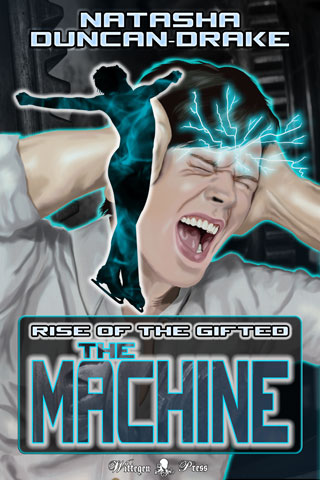
NEW RELEASE- The Machine: Rise of the Gifted #SciFi #Gay #Romance

The Machine: Rise of the Gifted

The Machine

Rise of the Gifted

by Natasha Duncan-Drake
Men in black aren't usually associated with figure skating, but when MiBs try to arrest men's champion Louis Hayes, his ex-rival Rafe Derouet finds out to his cost that telepathic x-files really do exist.

FREE 21st - 23rd Feb ONLY
(Starts 8am GMT- Midnight PST)
Smart Link to The Machine on Amazon

Rafe Derouet used to be a world class, British figure skater competing against his arch rival, flamboyant American Louis Hayes. A catastrophic knee injury ended his career and now all he can do is look on from the sidelines, commentating where he used to be a star. He hates Louis and wants nothing more than to see his nemesis go down in a blaze of failure.

Then mysterious men in black with guns take over a press meet, trying to arrest Louis, awakening something dangerous in their target, and setting in motion events they cannot control. Most shocking of all, Rafe finds out Louis can literally read his mind.

Dragged into a murky world of government agents and x-files by one of those x-files, Rafe finds his world view completely changing. And, along the way, his hatred for Louis proves to be something else entirely.

Now Rafe just needs to survive so he can decide what to do about it.

If you are kind enough to leave a review at Amazon I would like to give you a free short story sequel to say thank you. Please see the back of the book for details.

Excerpt (Listen or Read)


Rafe was in a hurry.

Whoever had had the idea to produce a US/Russian/Chinese special sporting event in celebration of the new economic treaty that was going through had to have been insane. There was figure skating and speed skating, long and short track, in the dual arena and athletics on the field and gymnastics in another arena down the road. It was as if someone had stuck pins in all the sports they thought the various countries were good at and then invited all the top athletes from the three countries to compete.

It was completely crazy and the whole world was watching, which was why Rafe was there reporting on it.

Given the current political climate, everyone was hoping sport could settle some of the latest rumblings. Rafe was waiting for it to all blow up in the organisers’ faces.

He had too many things to do and not enough time to do them, which was why he wasn’t really paying attention to his surroundings. The messages from his producer and his agent were far more important at the moment. If he had been giving thought to anything but texts he would have picked a different route.

“Well look who it isn’t,” said an all too familiar voice with an annoying American twang.

Not that Rafe found all American’s annoying, just this one in particular. He looked up from his phone to see Louis ‘pronounced the French way, darling’ Hayes less than three feet away.

Before he had fallen in the previous year’s world championships and shattered his knee, Rafe had been Louis’ arch rival on the ice. Competing for the UK in men’s figure skating, Rafe had spent the last few years swapping the number one spots in various competitions with Louis, but that was all over now. After eighteen months he could skate again, but he would never be able to compete at top level. These days he was doing TV shows and reporting for European sports channels and Louis was still glittering up the ice.

It made him want to knock Louis’ perfect teeth in with one of his skates all the more.

“Hayes,” he said and then realised that Louis was not alone.

Joy of joys, possibly his other least favourite person was standing next to Louis.

“And Voronov,” he added, wondering which deity he had pissed off to end up with both of them in the same place.

Voronov was a long distance speed skater for the Russians. Tall, blond and very much not sparkly, Voronov was an unlikely friend for a flamboyant American figure skater, but the pair had met at their first Olympics, hit it off and been firm friends ever since. Louis was something of a Russophile and had even been to Voronov’s wedding two years ago, which, given that Voronov was something of a state hero, had been quite a big deal. Louis was also one of the few allowed to call Voronov by a ridiculous nickname like they were in a club or something.

Rafe had met Voronov at the same time Louis had, only their relationship had started off more as instant dislike.

“You’re looking a little harassed there, Rafe,” Louis said, smiling sweetly.

The urge to deck the other man was strong. Rafe employed all of his skating will power not to do it.

“Places to be, important people to see,” he said, doing his best to get in a dig.

Of course he was all too aware Louis was much better at this game; Louis with his perfect hair and designer clothes and sycophantic fan base. It made Rafe grind his teeth.

“The competitors?” Voronov said, tone innocent, but Rafe couldn’t help it, he glared.

That stung.

There was nothing more in the world that he loved than the ice and it had been taken away from him. He honestly had no comeback.

Surprisingly he saw Louis dig his elbow into Voronov’s side. Maybe their antagonistic relationship did have lines. Once upon a time he and Louis had been friends and practice mates under the same coach, but then they had somehow become rivals. Rafe still wasn’t sure what had happened, but he had become the British poster boy for the international ice skating federation and Louis had become the American rebel with amazing talent.

“So, who are you commentating for this time?” Louis asked, clearly trying to be nice after Voronov’s below the belt shot.

That just rubbed Rafe completely up the wrong way.

“The BBC,” he said, digging his fingers into his palm to keep himself calm. “Now I’m late for a meeting, so I have to run.”

“Aren’t you co-commentating with the lovely Maria Hessle?” Louis said before Rafe could get away.

“Yes,” Rafe replied, doing his best not to grind his teeth and damning the polite genes his family had handed down.

“I’m sure I read somewhere that you and she were an item,” Louis said, “how’s that going for you?”

Louis’ expression was completely innocent, but Rafe wasn’t fooled, it was yet another dig. When they had been friends there may have been some adolescent fumbling between them and Louis was well aware Rafe’s tastes ran more to the male than the female: yet another bone of contention between them, what with Louis being out and proud and Rafe being firmly in the closet.

“You of all people should know not to believe everything you read,” Rafe said, as sweetly as he could manage.

The one thing he had to be utterly thankful for was that Louis was not the kind to out anyone, not even an ex-rival. Louis had had to defend his own sexuality so much, even before being officially out, technically, that Louis had the integrity not to do that to someone else. Didn’t stop all the digs though.

“Maria is happily attached to a Polish plumber from Chiswick,” he added, because he couldn’t help trying to rub Louis’ nose in the ridiculousness of tabloid reporting.

Of course it didn’t work, Louis just smiled.

“I find it always pays to check,” Louis said.

Every time they met it was the same with the subtle poking at his weakest points. And it galled Rafe to realise that he only understood his own sexuality so well because of Louis Hayes. He had done quite a bit of self examination over the years.

“Well, I really must go,” he said.

Louis clearly wanted to continue the conversation, but Rafe wasn’t sticking around to find out what for. The last thing his career needed was a headline about him trying to kill an American citizen on American soil.
~*~
Rafe was hovering, waiting for the next skater to come along for the press meet. It was currently Louis’ turn. He was supposed to have been interviewing everyone, but even his producer realised that asking him to interview Louis Hayes was a bad idea, hence his co-host, Maria, was doing it. He was in line to talk to the next skater in.

If Louis won things Rafe would have to bite the bullet, since he was the lead interviewer this time round. At least he could be thankful that it had turned out he was good as a celebrity commentator. However, these were just preliminary chats for sound bites, so he could get away with leaving it to Maria.

“Sorry, Ladies and Gentlemen,” a member of the event security team walked up to the gathering, “I’m going to have to ask you to move to a new area. This one is needed for warm up.”

That sounded odd to Rafe, because he was pretty sure no one was due on the ice yet today and he hung back. Louis looked equally put out, which was actually kind of funny. Rafe guessed Louis was bitching to his agent, who patted him on the shoulder, and followed the gaggle of press out as Louis went to make for the locker rooms. Rafe couldn’t resist stepping towards his ex-rival, just to see if he could get an annoyed sound bite. Those he was actually quite good at when it came to Louis.

Louis was trying to find something in his huge, oversized bag, by the looks of things, so Rafe waited for his chance. However, it never came. As soon as the press were out of sight men in black Kevlar appeared from several different places with guns. The truly bizarre thing was that they all seemed to be pointed at Louis.

“Nobody move,” was the shouted order and Rafe froze.

It was difficult for Rafe to believe what he was seeing and, if his face was anything to go by, Louis was just as shocked. Louis raised his hands, staring at the men in black with guns, clearly terrified. Frankly if there was anyone less likely to need a gun pointed at them Rafe had never met them.

“What’s going on?” Louis asked, sounding as confused and petrified as he looked.

“Don’t move,” was the only response and then a woman appeared.

The way Louis’ eyes opened slightly and a frown of confusion appeared on his face, replacing the complete shock, Rafe guessed Louis knew her…
FREE 21st - 23rd Feb ONLY
Smart Link to The Machine on Amazon

Monday, 8 February 2016

I am seeking pre-release reviewers for my new book to post during the launch week which starts on 21st Feb 2016. When you boil it down the new book is gay romance with telepathic figure skaters, so if you like that sort of thing, this is the book for you :).

I can provide an ARC of the book in PDF, Kindle (mobi) or ePub.

There was an earlier version of the story published as part of the giveaway games anthologies, but this one has been re-polished and it has grown by a third, so it is a lot different to the original. If you think you've already read it, you haven't :).

This will be an Amazon only launch (have finally caved and am trying out a new system) so the reviews would need to go there, thank you.

You can drop a comment with an email where I can contact you or drop me a line via the contact form in the left side margin and I will get back to you.

Many thanks to anyone who is interested.

The Machine - Rise of the Gifted by Natasha Duncan-Drake
Title: The Machine (Rise of the Gifted)
Author: Natasha Duncan-Drake
Rating: PG13
Genre: Contemporary SciFi, Romance, Gay
Length: novella (22.5K)

Rafe Derouet used to be a world class, British figure skater competing against his arch rival, flamboyant American Louis Hayes. A catastrophic knee injury ended his career and now all he can do is look on from the sidelines, commentating where he used to be a star. He hates Louis and wants nothing more than to see his nemesis go down in a blaze of failure.

Then mysterious men in black with guns take over a press meet, trying to arrest Louis, awakening something dangerous in their target, and setting in motion events they cannot control. Most shocking of all, Rafe finds out Louis can literally read his mind.

Dragged into a murky world of government agents and x-files by one of those x-files, Rafe finds his world view completely changing. And, along the way, his hatred for Louis proves to be something else entirely.

Now Rafe just needs to survive so he can decide what to do about it.


If you are interested in being a pre-release reviewer for other Wittegen Press books as well, we have a reviewer pool mailing list. Simply fill in this form at the link below to apply and we will add you to the list.

Thursday, 5 April 2012

Free books on Amazon sales analysis - Month 3

I'm not really sure anyone is interested any more, but I shall carry on regardless :).

For those wondering what on earth I'm going on about, I have been analysing my sales figures after having Amazon price match one of my free titles and hence upping my profile on their site.

An interesting result this month

My overall sales are up by 5%.
The sales of the book in the same series as the free book were down 14%.
My sales not counting the series with the free book were up 87%.

So it's still looking like a very worthwhile endeavour. We're still not talking huge numbers here, but while it's going up I'm ecstatic :).

I have just added a new book which I'm going to do the same thing with, i.e. it's the first in the series and I will attempt to have Amazon price match it to free just in time for when I put the second book up.

Tuesday, 6 March 2012

Choosing a book on Amazon

I was chatting to my husband in bed the other night, as you do, and we were talking about free eBooks. I've been doing the rounds of the Amazon UK store to find free titles to try out new authors. He suggested I analyse how I pick which books to download and read so that I could better anticipate what a reader might be looking for. Then I thought to myself it might be an interesting topic for a blog post, so here we are.

Please remember this is me analysing my instinctive reactions when glancing down a list of books, so it might not make complete sense.

I actually surprised myself, the first thing I look at is not the cover; it's the title. I thought it would be the art work that would grab my attention first, but turns out it's not. I'm not going to lie, I am a picky reader; I have very specific likes and dislikes and if something in the title puts me off I rarely even glance at the cover.

Titles are complex beasties, but here is what I gathered from making myself stop and think:
  • Titles that say "Part 1" rather than "Book 1 of..." or "Volume 1 of..." make me less likely to click. "Part 1" makes me think the story will be incomplete, which, in most cases, is probably not true, but it's the conclusion I came to when analysing how my peculiar brain works. 
  • If the title is too long, it puts me off. I honestly can't figure out why, but for some reason a long title makes my eye slip on to the next book. However, if the title gives me nothing, i.e. it doesn't tell me something of what the book's about, I am less likely to click, so short can also be a problem. Of course a one word title can tell me a whole lot e.g. I'm much more likely to click on a book called "Cursed" than I am a book called "Kisses". The first screams paranormal at me and the second tells me nothing except there might be lip action.

If the title has my attention I turn to the cover. The book definitely gets bonus points if I can read the title from the small cover, but I realised this isn't a skip point for me. It helps, but it does not sell me the book.

Everyone I've ever talked to about books has always said the cover is incredibly important. It's the advertising for the book and I am clearly a typical customer, because, when I think about it, the cover can pique my curiosity or make me skip on. If the cover looks amateurish or does not fit the genre I am looking for I skip over it. It may be shallow, but it's what I do and I suspect it's what a lot of other people do whether they are aware of it or not.

If the cover gives me a hint about the subject matter of the book it also helps. A vampire with fangs on the front may be cliché, but I'm much more likely to look if my favourite genre is advertised right there in front of me.

Those are the two things that make me click the link.

The rating only comes into it if the book has an average rating of less than 3 stars, but it still doesn't stop me clicking on the link.

Next is the description, the equivalent of the book blurb on a paperback. I cannot stress how important this is. I may love the cover, I may think the title is brilliant, but if the blurb is badly put together, badly spelled or just not very informative I hit the back button. There was one book I looked at, the cover caught my eye, the title was fine, but the blurb consisted of six words that told me nothing. Click, back I went to find a title where the author could be bothered to tell me something about the book.

If it's a free book, I like the cover and I like the title, the book blurb isn't terrible and the rating is 3 stars or above, I'll download it. Simple as that. The best covers and the catchiest titles will get me first and I'll keep looking until I have enough to be going on with.

However, a 3 star rating is not a must. If the cover and the title look good (and they probably have to be a bit more special than high rated or unrated books) I will go check out a book with a lower rating, but what I do then, as well as reading the blurb, I go and see what the reviews had to say. Sometimes a book is trolled and people give it bad reviews for the hell of it and it's usually easy to tell when this has happened. This is why the rating is definitely not the first thing I look at, that and the fact that I have been disagreeing with reviewers for years and am unlikely to stop any time soon. When you're a fan of the vampire genre you take every review with a pinch of salt.

If I'm still not sure I take a look inside the book before I will click the buy link. The most annoying thing I have seen so far which put the author on the "never click again" list was a preview that consisted of the front cover and a paragraph with a web address. That is not a preview, that is what I can see on the main web page.

So, that is basically my decision process laid out. I am sure some people have other processes, but I suspect a great many do it the same way I do. Until I actually sat down and thought about it I honestly had no idea what my thought processes were, it was just like magic magnetism. I suspect my thought process for buying a book over a certain value will be different, but I haven't analysed that, so I'll let you know when I do.

I would be most interested to hear how other people go through the process.

Thursday, 1 March 2012

Free Books on Amazon - the Update, Month 2

Well I promised to keep everyone updated on how having a free book on Amazon continues to affect my Amazon sales. So here goes.

My free book on Amazon (Forgotten Soul) was downloaded 7272 times in February compared to 3758 times in January.

I've just analysed the number of sales rather than free downloads comparing January 2012 to February 2012 and it's official; it works. My sales are up by 107% overall against last months sales which were already up over 100% on December's sales.

Here's a breakdown by country for the increases this month:
  • UK - up 378%
  • US - up 88%
  • DE - up 100%
  • FR - down 100% but that was only one book in Jan.
Once again, however, it seems to be the series that makes this work. In Jan my other book sales went up, but they have stayed at a similar level for Feb rather than increasing again. It is the second book (Forbidden Soul) in the series for which the first book is free (Forgotten Soul) that is selling so well.

The free book (Forgotten Soul) has almost consistently been in the top #20 Free books for it's category on Amazon UK (#9 being the highest) and the top #100 for the US (ranging from #36 to #100 depending on time of day etc). Which has upped the profile of the sequel which is 99c.

So, on current evidence I would say having a free book permanently on Amazon does two things:
  1. It lifts sales of unconnected books, but does not encourage them to continue increasing beyond a certain level.
  2. If the books is part of a series, it continually helps increase sales of others in the series.

Thursday, 2 February 2012

Free Books on Amazon

I've seen several people talking about whether putting a book free on Amazon is a good idea or not. I'm not going to go into the whole KDP Select thing because I very much don't like the exclusivity clause that is involved in it. However, I have had one title price matched to free, which for me has been brilliant.

I've analysed my numbers from December to January and having a free book (Forgotten Soul ) on Amazon has doubled my sales.

I'm definitely still at the don't quit your day job stage, even though this is my day job and I can only do it because I have a wonderfully talented husband and a low mortgage :). However, it's an upturn when, ever since Amazon played with their system back in the middle of last year, my numbers have been pitiful.

However, for those considering putting titles free on Amazon, I think I should point out a couple of factors.

  1. Most of my new sales were for Forbidden Soul, the direct sequel to the free book.
  2. The few extra sales I saw on other books were for books of the same genre. It didn't touch my YA novel figures.

Hence I think it's probably a good idea to plan exactly how you make your titles free if you are going to do so. I suppose it makes sense that if someone has read a book of yours in a genre and liked it, they are more likely to go for the same genre again. It is also likely that fans of a certain genre go for that genre and not an alternative one.

It's actually given me a lot to think about, which is why I thought I'd share what I've seen. Of course this is only one month, I have no idea if I will see the same again this month, but I have already seen more sales in two days than sometimes in a whole week in Dec, so here's hoping.

I'm seriously considering writing a YA short story/novella just so I can put it up there for free and have a free book in my other market segment. (Only once I've published "Cat's Creation" the sequel to Cat's Call, though, promise :)).

I would be very happy to hear if anyone else has had similar or completely different results. I know that KDP select only lets you put your book up free for five days, where as mine are intended to be free for as long as the system will let me do it, so experiences may differ.